Showing posts with label Computer Tricks. Show all posts

Monday, 9 February 2015

hey guys. Today i am gonna give you Linux Window for PC free download. Linux window community growing very fast because linux performance is very fast and non virus system performing system.
Linux is the best  window because it open source operating system the developers get more freedom in modifying and optimising the system for maximum performance boost.

Screen shorts.


To download use this,

Click here

OR

So today i will tell you how to create your own fake sms sender with Sender ID World wide.
So here we will use a server called NEXMO..
What is Nexmo?
Nexmo is a cloud based SMS API that lets you send and receive high volume of messages at wholesale rates. For Web Site click here
How It Works?
To watch how it is work click here
Requirements
CodeIgniter 2.0.0+
PHP 5.2.0+
PHP extension: openssl, pcre, json, xml, curl
So Follow the Steps==>
1). First go to Nexmo.com and create free account. And copy your Api and Secret keys..
2). Now Download fake sms script ...click here
3). Upload it on your web host ..
4). Edit your send.php and search for this line
Quote:$nexmo_sms = new NexmoMessage('api', 'sec');
and replace api with your Api key and sec with your Secret key.
Default password of the script is "wildhacker" you can change it, search for this line in send.php
Quote:if ($password !=='madjack') {
replace madjack with your password..
5). Click on save and open your site ..and use your fake sms sender and troll others..
Note==> in 1 account you can send 400 messages after that you have to create new account...

Wednesday, 28 January 2015

Hey guys, Today i am gonna show you how to download and install asphalt 8 games on your PC. Asphalt 8 is a car game and have very high resolution graphic etc. Asphalt 8 is a android application game to Run this game on PC we have to Download and install Bluestack software. Bluestack is the best software in operating android apps and games. So, start it by following the steps below ...

Step to download and install asphalt 8

  1. Download Bluestack software Click me
  2. After downloading and installing bluestack go to desktop and open bluestack 
  3. In the bluestack on the top left corner click on search.
  4. search "Asphalt 8" before search their is a existing method sign in with your gmail account and then search again
  5. Then play store gives you the game, click on asphalt 8 and then click "Install"
  6. After downloading Install asphalt 8 
and enjoy android mobile app on your PC absolutely free (if you like my post give me feedback ;) )
Hey Guys. Today i am gonna teach you how to download and install bluestack. Bluestack is one of the best emulator to run android application. If you wanted to install some android app or games So, download and install bluestack. Bluestack is the best software to run android application in personal computer. We can easily run android application by the help of bluestack. Bluestack is available in all version of windows Example, windows XP, windows 7 and windows 8. You can Install any android application and use it on you PC....

Steps to download bluestack.

  1. To download bluestack Click me and downlad it.
  2. After downloading go where you download it and Run the application.
  3. Confirm that if you get a warning.
  4. Accept term in the licences agreement. Windows installation wizard welcome.
  5. Complete the wizard and install the bluestack application.

Installation of apps and games on your pc

  1. Go to the desktop and double click on bluestack app.
  2. Click on search and type the application or game name (eg. angry bird) click find it.
  3. Click install it in the application list.

How to open, use an app.

  1. Click top left on the my app button. Contain all application you install in bluestack software.
  2. Click the application that you wanted to open, use it as you would on your phone, tablet.
  3. After using application to return bluestack main menu, click on the program icon that is down in the middle.

To Uninstall an application.

  1. Click the setting button.
  2. Click on manage application.
  3. Click delete to the right of the app you wanted to uninstall. Confirm that you want to continue.
  4. Then click done.

Tuesday, 20 January 2015

Hey guys. I am gonna show you how that you can use your voice to dictate to your computer. EG, you can dictate text to word processing program, such as wordpad, to type a letter.

Dictating text. When you speak into the microphone, Windows Speech recognition convert your spoken words into text appear on your screen. Follow the step to do.

STEPS... 
  1. Click on start button(If you are using window 7 click all program), then click Acessories, click Ease of access, and then click Windows speech Recognition.
  2. Say "start listening" or click the Microphone button to start the listening mode.
  3. Open the program you want to use or select wordpad, notepad you want to dictate text into.
  4. say the text that you want to dictate.

Correcting dictation mistakes.
there are some ways to correct mistakes made b during dictation. you can say "correct that" the last thing you said. to correct a single word, say "correct" followed by the word that you want to correct. If the word appear more than once, all instance will be highlighted and you can choose the one that you want to correct. You can also add word that are frequently misherd or not recognized by using the speech Dictionary.

To use the Alternative dialogue box
  1. Click on start button(If you are using window 7 click all program), ten click Acessories, click Ease of access, and then click Windows speech Recognition.
  2. Say "start listening" or click the Microphone button to start the listening mode.
  3. Do one of the following
  • To correct the last thing you said, say "correct that."
  • To correct a single word, say "correct" followed by the word that you want to correct.
     4.In the Alternates panel dialogue box, say the number next to the item you want, and then click "ok"

Note; To change a selection, in the Alternates panel dialogue box, say "spell"followed by the number of the item you want to change and then "ok."

To use the speech dictionary
  1. Click on start button(If you are using window 7 click all program), ten click Acessories, click Ease of access, and then click Windows speech Recognition.
  2. Say "start listening" or click the microphone botton to start the listening mode.
  3. Say "open Speech dictionary."
  4. Do any of the following.
  • To add a word to the dictionary, click  or say add a new word, and then follow the instructions in the wizard.
  • To prevant a specific word from being dictated, click or say Prevant a word from being dictated, and then follow the instructions in the wizard
  • To correct or delete a word that is already in the dictionary, click or say Change existing word, and then follow the instructions in the wizard.

    Note: Speech Recognition is available only in English, French, Spanish, German, Japanese, Simplified Chinese, and traditional Chinese.


Friday, 21 November 2014

Hey guys, Today i am gonna give you facebook password decryptor. This is not hacking and cracking software this software was help you if you forget your own facebook password, So he helps you to recover facebook password that is previously stored in web browser/messenger.

                                                             To download us this,
                                                                      Click me

Saturday, 1 November 2014


Window 8 transformation pack 9.0 free download

Hey, Today i am gonna show you how to download window 8 transformation pack 9.0. Window 8 transformation pack 5.0 will transform your windows 7/vista/XP user interface to window 8. Including window 8 boot screen login screen,theme,wallpapers,Icon,sound,font,metro UI,Aero auto-colorization,taskbar user tile.


                                                           To download use this,
                                                                   
Click here.

Auto Clicker 2.3 free download

Hey, i am gonna show you that how to download Auto clicker 2.3 free download.
Auto clicker is a Auto clicker software.
It can free you from repeat mouse click, it can free your finger
It can record you mouse action, then playback them as you want some time.
It can click an area in buttom web page game and any screen


                                                                   To download use this,                                                                                                                            Click here.


Intel Turbo Boost Technology Monitor 2.6 free download

Hey, Today i am gonna show you  how to download intel turbo technology monitor 2.6 free download. The new sandy bridge processor (core i5 and core i7 (Extreme) - series) - Also 3rd generation have the Intel turbo boost technology, the cores, can be briefly overclocked


                                                         To download use this,
                                                                    Click here
Hey, today i am gonna show you how to download window 7 theme 2.6.  if you are an android fan and wanted android theme like window 7 theme. It was the android theme that can be show you to download this theme and run it. It consist of 25+  custom android wallpapers, custom android icon and some funky sound which every android fan would like.


                                                      This was the one screen short,

                                                   To download use this,
                                                            Click here.

Monday, 6 January 2014

Hi, i am going to teach you how to find delete message on facebook it is very easy trick to get delete message i an going to show you do step by step ..


1. First open facebook and log in ...


2. Then click on upper right corner click the setting icons ...

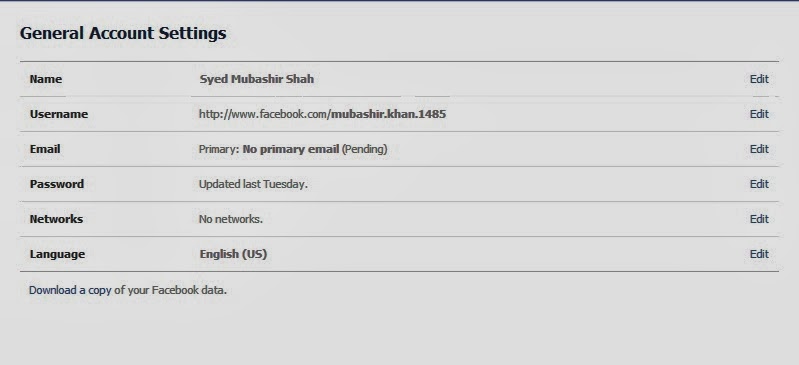
3. click on account setting ...


4. Now this windows will open ..


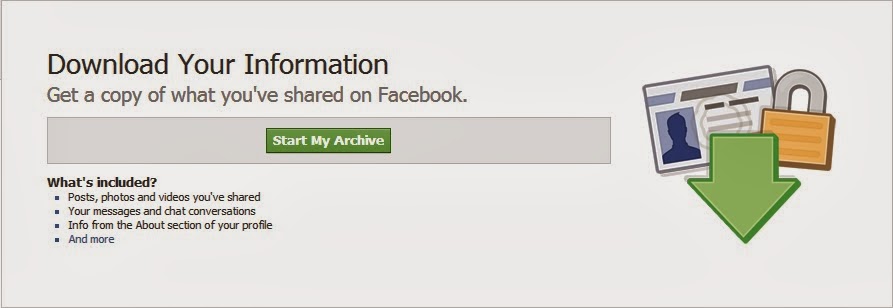
5. In the bottom you can see  (download a copy) click on it ( picture below ) ...


6. Now click on start my archive ...
                                     

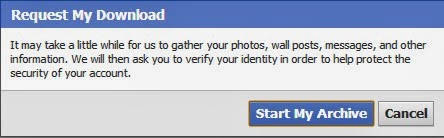
7. then request your download ( click on start my archive ) then okay ...


8. Then wait 1 to 2 hour till your download ready ...

9. After that log in to your email address facebook emailed you download it and enjoy your messages ......


Monday, 11 November 2013

The easiest way to make money online. Only 10 to 20 mins work daily with automatic tool.
100% guaranteed income without investment.
Get free complete training in URDU language.
Totally Free of Cost.
 Start right now
and earn money
You can Earn 150 $
pkr 1500 rupees..

To download this book use this ,
Click here

Tuesday, 15 October 2013

Now, I am going to teach you how to set password in folder without any software. It is very easy trick to set password in folder. But folder will have to be converted into winrar archive file so what at least you will be satisfy that your personal data is secure and no one can use your data else you or any one who know the password told by you. ok now going towards the point, following point will help you to set password in folder without any software. do step by step....

 DO STEP BY STEP..

1. Create a new folder from right click on desktop and then select new and click on that folder.
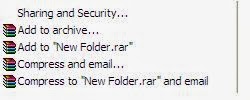
2. Right click on folder so that some option will appear that are given below...                                      
3. Click on "add to archive"
4. The new window will appear are given below.                          


5. Click on "Advance" then click  "set password"  


6. The new window will appear and then you have to set password and Re_Enter your password , the options you will see below the password then tick on  "Encrypt file names"  as shown in picture below.                                                                          


7. Then click "OK" the folder will converted into winrar archive file, double click on winrar archive file the file asked for the password which you have set.
8. Enter the password and use your folder as you need
9. And if you want to add file and folder in this winrar file so click on add file and add that.


Thursday, 26 September 2013

SHUTDOWN YOUR PC AUTOMATICALLY:

What would be happen when you are watching any movie and getting sleep? There are much software where you can solve this problem.

Airytec Switch Off
After installation you will see a system tray icon. There is Automatic shutdown, suspend or Hybernet option are in it. It automatically disconnects from Dial-up or VPN. You can remotely shutdown your PC via web interface.
Download it from: www.airytec.com

Delayed Shutdown
If you getting sleep when you hear any song then install this software in your PC. There is sleeper timer option in it where you can set time. You can sleep easily.
Download it from: www.styopkin.com

Scheduled Shutdown
This is very small program. The size of this program is only 1MB. After installation you can access it from start menu.
Download it from: www.soucreforge.net

Thursday, 15 August 2013


Hi, today i am going to teach you how to download playstation2 emulator (PCSX2 0.9.8), how to install and how to play playstation2 games ok so i am going to start.....

TO DOWNLOAD USE THIS..
http://gstsyedlab.blogspot.com/2013/08/pcsx2-098-free-download-100-works.html
download it ....
NOW DO STEP BY STEP..
                                           1. After complete download Extract All file...
                                           2. Now copy bios and paste it in to PCSX2 0.9.8 then double click on                                                            application picture below.....


 3. Select language then click on apply picture below...

                                         4. Now click Next and Next....
                                         5. click on USA Console then click finish picture below....

                                                                            
                                         6. Now it will open like this picture below......
             
         
7. Now click on CDVD > Iso Selector >Browse
8. select game and the click on system then select
Boot CDVD (Fast).....
You will done Enjoy....

Thursday, 25 April 2013


talking computer

You can create voice from your computer. whatever you will write in the box, computer will talk the same words. process the given below. 
·                                  open notepad and write this code. 

Dim message, sapi
message=InputBox("aslam-o-alaikum friend. I am going to read book ?","Speak to Me")
Set sapi=CreateObject("sapi.spvoice")
sapi.Speak message

·                                 in this code i have written (aslam alaikum friend I am going to read book) but you can change it but don't change any other word from the code.·                                 Now save this file with extension .vbs
·                                 Now write some thing in the box and click ok and done :))

change the back ground of welcome screen…..

There is another trick to put a background of your own choice on windows xp for the welcome 
screen. It is very interesting trick and you can use it easily. follow these instructions for this trick.
1.  Open your browser and type www.google.com.
2.  In search bar type "logon studio" and press "i 'm feeling lucky"
3.  you will see a webpage. http://www.stardock.com/products/logonstudio/
4.  Press the button download near "logonStudio" 
5.  On the next page you can see heading "LogonStudio For XP Download". 
     Click on download button found right side of this heading.
6.  Save this setup file and double click to install the software.
7   In this software you see 3 available logos and also you can download more logos from the link 
      mentioned below. Select any logo and click Apply. 
 8.  And you are done

Saturday, 20 April 2013


3.SPEED UP BOOT BY DISABLING UNUSED PORTS.!!
You may have tried many tweaks like modifying windows XP start-up applications, prefetches, unload DLLs method, etc. And yes those methods do work for me.
                    I have just accidentally found out another way to give you an extra boost in windows XP's boot performance. This is done by disabling your unused devices in Device Manager. for example, if you don't have input devices that are connected to one of your USB's or COM ports, disabling them will give you an extra performance boost in booting. Go to Control Panel -> System -> Hardware tab -> device manager Disable devices that you don't use for your PC and then restart.

Boot Or Start Computer Faster


Many computers take a lot of time to boot (or start ).This is due to many reasons.

Some slight changes can do wonders for your system:

1. Press start->run then type msconfig and press enter.

Go to the startup tab. Here you will see a list of startup items. These are all the programs that automatically start when you boot your PC. It is these that slow down the boot up process.
                                 So uncheck all the unwanted items like ms-office, messengers other utilities that u may not need at startup). Don't uncheck your antivirus software.

Restart your Pc to and see for yourself, your pc will now boot faster....
 
2. A great new feature in Microsoft Windows XP is the ability to do a boot defragment. This places all boot files next to each other on the disk to allow for faster booting. By default this option is enabled, but on some systems it is not, so below is the information on how to turn it on:

Go to Start Menu and Click Run
Type in regedit then click ok
Find "HKEY_LOCAL_MACHINE\SOFTWARE\Microsoft\Dfrg\BootOpt imizeFunction"
Select "Enable" from the list on the right
Right on it and select "Modify"
Change the value to Y .
Reboot your Pc and see the change yourself.:)))))))))))

Remove shutdown button
To remove the shutdown button from the logon screen in WinXP and 2K, use regedit and navigate to the following key: HKEY_LOCAL_MACHINE\SOFTWARE\Microsoft\Windows\CurrentVersion\policies\system change the value of the dword 'shutdownwithoutlogon' to '0'. exit regedit.
ok you done :))))))))))